
ade code is ADE in your terminal — the same lanes, chats, and PRs as the desktop app, rendered as a fast TUI. It attaches to the same machine, so a chat you start in the terminal shows up on the desktop and your phone, and vice versa. Start in the shell, finish anywhere.
Launch it
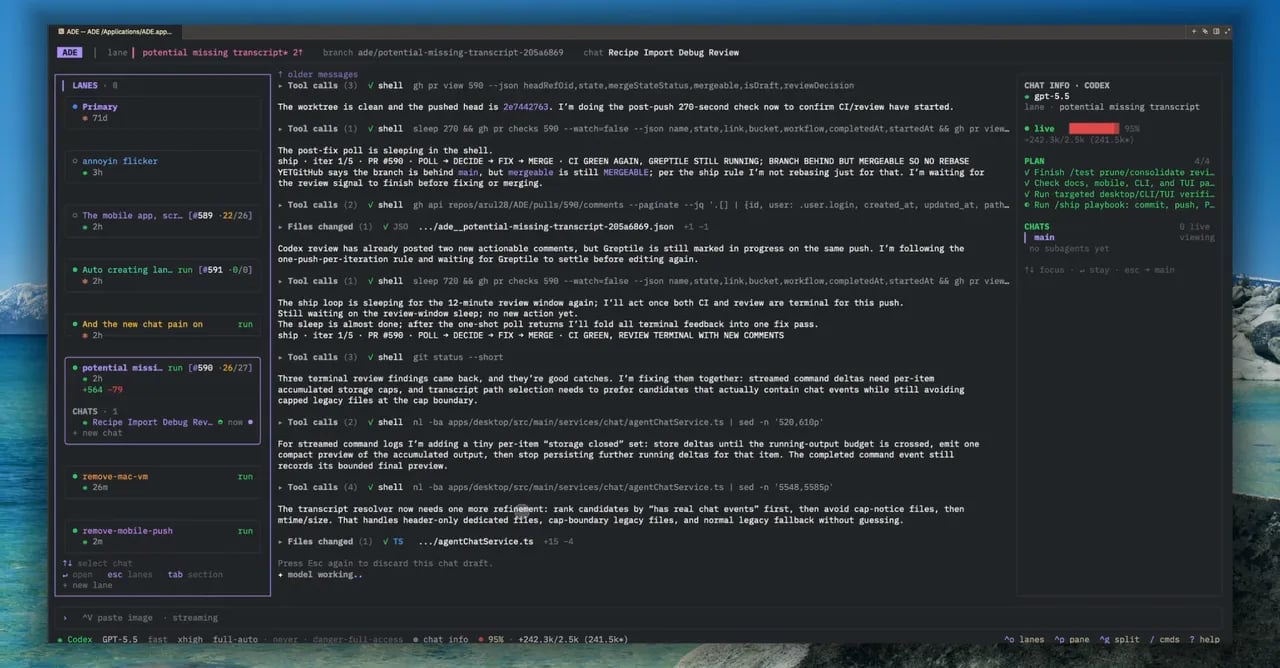
What you can do
Run agents
Start and steer chats with any provider, watch tool calls stream, and approve diffs.
Manage lanes
Create, switch, and inspect lanes without leaving the keyboard.
Ship PRs
Commit, push, and open PRs with slash commands; check CI from the side pane.
Work over SSH
Run it on a remote box and drive ADE entirely from a terminal session.
Slash commands
Most actions have a slash command. A few of the common ones:Common slash commands
Common slash commands
Type
/ in the composer to see the full list for the current session.ade code is a client of the same runtime as the desktop app — it isn’t a separate copy of your project. Both read and write the same lanes, transcripts, and PR state.Agent chat
How chats, providers, and tool calls work.
Remote machines
Point ADE at a repository that lives on another box.